Hub Vs Switch Vs Router – What are their differences?
For seamless operation of a network, there are a few components that can be used. In the following article, we are going to compare a hub, switch and router, highlight the functions and differences as well as provide an in depth review of respective products
The differences between hubs, switches and routers are mainly due to the difference in functionalities. However, they share one common denominator: they all allow you to connect more than one computer to the network. All of the also feature more than two ports. Hubs are considered unintelligent networking devices since all they do is pass on received data from one connection to the next. It is usually not required in a home network setup but can be useful for larger scale networking such as schools. A hub operates on the physical layer of the OSI model. A switch is also unintelligent and is used to provide extra ports for wired connections. It uses MAC addresses and sends data to the destination address stated. Routers are the most common devices today and are intelligent networking devices. They work by routing internet traffic into the connected devices either wirelessly or through cable. Take a look as we compare them and provide some of their top products.
Table of Contents
What are the differences between aHub, Switch and Router?
Devices |
Hub |
Switch |
Router |
Ports |
Multiple ports |
Multiport bridge |
Between 2 and 8 depending on the brand |
Form of data in transmission |
Frames and electric signal |
Frame and Packet |
Packets |
Connectivity |
Wired |
Wired |
Wired and Wireless |
Layer |
Physical layer |
Physical |
Layer 3 – Network Layer |
Speed |
NA |
1 Gbps or 10/100 Mbps |
1 Gbps or 10/100 Mbps |
Mode of transmission |
Full or half duplex |
Full or half duplex |
Full duplex |
Type of address |
MAC address |
MAC address |
IP address |
Product |
Hub vs Router vs. Switch – How do these devices compare?
Functionality and use
Each of these device serve a specific purpose in a network setup. A hub is somewhat a toned down version of a switch since it performs the basic functions of a switch. Hubs are passive devices with no software that act as a common connection point for multiple devices in a network. It is a dumb device. It also has multiple ports that allow connection in as many devices as possible. There is little to separate a hub and switch. However, switches are more intelligent than hubs as they provide more functionalities and do more data processing. A switch filters and forwards data packets between the same LAN segments.Switches are categorized as consumer grade and corporate switches. Consumer grade usually allow between 4 and 8 devices to be connected while corporate switches are large and allow between 32 and 128 devices to be connected. Routers are the smart of the bunch and work like small computers. A router performs many functions but the main one is to direct traffic into your devices by translating the internet service provider signal into a standard digital signal that can be used by all devices.
Supported devices
A hub supports any device provided they are connected to it via cable. The same applies to switches. Anything from a PC, console, server or laptop can be connected to a switch. Routers support a wider range of devices due to their wireless connectivity support. They can be connected to wireless smartphones to other routers through cable. Routers are generally more versatile than the rest of the devices
Ports and connectivity
Connectivity is one of the most important component of any networking device. A device can either support wired or wireless connectivity or both. Both hubs and switches support only wired connections. Because of this, they usually come with many ports. A hub can have between 2 to 12 ports of different types from Ethernet to DSL connections. Switches are similar but come with many more ports. Consumer grade switches feature at least 4 ports while industrial grade have a minimum of 32 ports and maximum of 120. Routers also come with ports, with an average of about six ports for a standard modern router. The ports are either RJ45 Ethernet, USB or SFB in special industrial routers.
Pricing
Since price is such an important factor, it’s important to look at how much these devices. Hubs are the cheapest of the bunch and average less than $50 per unit. Switches are slightly more expensive as they offer much more functionalities and have more ports, averaging about $50 a unit. Routers are the most expensive and most diverse in pricing. There are routers below fifty bucks and other that cost up to $500. The fact is however, that you will spend more on a router than all the other devices.
Hub vs Router vs. Switch – A comparison Overview
Hub
A hub is an old device that’s quickly becoming obsolete as time goes. It resembles a switch in design with a few slight differences in how they work. A hub is simple a device with multiple Ethernet ports that allows you to connect other devices. All the hub does is pass on the received data to the receiver. This is the reason it known as the least intelligent networking device in the market today. It transmits the network signal to each port except the receiver port. The hub operated on the physical layer of the OSI networking model. The following isan example of a hub you could buy today.
Satechi Aluminum Multi-Port Hub

- V2 MODEL - your favorite Satechi Aluminum Multi-Port Adapter just got even better with an upgraded Micro...
- EXPANSION PORTS - includes 4K HDMI (60Hz), Ethernet, USB-C PD Charging up to 60W, SD/Micro Card Reader...
The Satechi hub comes with eight ports with a slightly different lineup compared to the previous. The ports include: a 4K HDMI port, Ethernet RJ45 port, a USB type C for charging, SD reader port and three USB 3.0 ports. There are very few devices that cannot be connected to this hub. In addition, it comes with a plug and play feature that does not require any installation processes. It is important to note that this hub is pricey and may not be the best choice if you’re on a budget. However, we recommend for the robust and sturdy design that ensures durability even when traveling. The Satechi hub comes in multiple color: space grey, silver and gold.
Switch
A switch is basically a slightly advanced hub. It is a small device that is used to filter and forward packets of data between LAN segments. Furthermore, they operate on the data link layer and sometimes the network layer. Like hubs, switches come with multiple ports for wired connections. In fact, switches have the largest number of ports compare to other networking devices. It sends data in form of packets where they are needs and therefore reducing the congestion of data on the network. This improves the security of the connected devices and also works to improve the general performance of the connected devices. It is important to note that a switch does not provide any routing capabilities.
Netgear GS308 8 Gigabit Unmanged Ethernet Switch
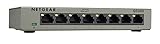
- PLUG-AND-PLAY: Simple set up with no software to install or configuration needed
- VERSATILE MOUNTING OPTIONS: Supports desktop or wall mount placement
The Netgear GS308 is a huge switch designed to connect directly to your router or modem. As the name suggests, it comes with eight ports of which any can be used to connect to a primary router. It is easy to use and features amazing extra features such as auto-negotiation. This feature allows automatic highest speed connection between the switch and connected device. It also eliminates block switching to ensure maximum speeds are reached.
Router
A router is the most intelligent networking device we have. It is a combination of hardware and software that works together to provide solid connections for connected devices. A router works by receiving data traffic and translating and routing it into the device for internet access. It does this using two important features: Network Address translation and Dynamic Host Configuration Protocol commonly known as DHCP. First DCHP is used to assign dynamic addresses for the connected devices for them to be able to communicate with the router. NAT is responsible for translating IP packets.
Google Wi-Fi
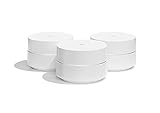
- A new type of connected system for seamless WiFi coverage throughout your home, helping eliminate dead...
- Replaces your current router, and works your modem and internet service. It’s compatible with major...
One of the most popular and most used mesh router systems today is the Google Wi-Fi router. It is a dual band WI-Fi system with a gorgeous design and fantastic features. The routers are easy to identify from the signature cylindrical shape. Each unit also contains a white plastic covering with a matte finish. The matte prevents dirt such as finger prints and stains from getting stuck on to the surface of the piece.On top of that, this router is small and resembles face cream. It is well built and designed and has an LED light running through the circumference of each router. Each router has two gigabit Ethernet ports and a USB Type C port for power. It is easy to setup and later manage routers through the mobile app.
Device |
Satechi Aluminum Multi-Port Hub |
Netgear GS308 Unmanged Switch |
Google Wi-Fi
|
Ports |
6 |
8 |
2 |
Speed |
100 Mbps |
1 Gbps or 10/100 Mbps |
1 Gbps or 10/100 Mbps |
Special features |
4K Support |
Data filtering |
Google Home Assistant support |
Availability |
Conclusion
Hubs and switches simply cannot function independently and need a router or modem to be useful. This means that the router you choose matters most. Google Wi-Fi is a top performing router that will support both the Satechi hub and Netgear switch with ease.


