TP Link ac2300 vs. TP Link ac2600 – which offers the most secure connection
Having a home router is your gateway to fast internet connection for an array of devices. The router can allow you to connect up to 60 devices at a go. Here we check out the TP Link ac2300 and TP Link2600
When selecting the ideal home router a number of factors come up for your consideration. If you are living in a large house with multiple rooms then what you are going to be suffering from a lot is coverage and range. Routers slow down their transmission speeds when you have lots of walls and ceilings. They also suffer from network interference from things like microwaves, smartphones and other devices that emit radio frequencies.
It is imperative that you choose a router with the right range and speeds if you are going to avoid buffering problems with your router. TP Link has been in the forefront in developing some of the best routers in the market. In this review, we check out the TP Link ac2300 and ac2600 and tell you which is ideal for your home.
Table of Contents
What are the differences between the TP Link ac2300 and TP Link ac2600?
Model |
TP Link ac2300 (Winner) |
TP Link ac2600 |
Processor |
Broadcom’s BCM4365E 1.4GHz dual core chip |
Dual core Qualcomm 802.11ac 1.4GHz |
Dimensions (inches) |
8.5 x 7.5 x 1.5 |
1.5 x 10.4 x 7.8 |
Communication protocol |
WMM, IPv6 |
WMM, IPv6, QoS |
VPN Protocol |
OpenVPN |
IPSec, L2TP, PPTP |
Range |
802.11ac delivers 939.6Mbps at 5 feet, 682.3Mbps at 15 feet |
For 5GHz band at close proximity you get 311Mbps |
Availability |
TP Link ac2300 vs. TP Link ac2600 – How they Compare
Design
The ac2600 has a basic design that is may fool you when it comes to the router features. The router does not disappoint being equipped with MU-MIMO technology and Qualcomm VIVE 802.11ac circuitry. The router comes in a black matte finish with silver trims on the side, measures 1.5 x 10.4 x 7.8 inches. It also holds two radio bands – 2.4GHz and 5GHz. The ac2600 features four removable and adjustable antennas at the back. At the rear you also get a WAN port, four Gigabit Ethernet ports and a power switch. You will find LED lights on the top of the router for showing the status of the two bands and power.
The ac2300 is a budget friendly router with some of awesome features. You will find network prioritization, parental controls and an anti-virus software. The ac2300 is lightweight and comes with three detachable antennas. On the top you have a mesh for ventilation; this ensures you do not experience any overheating with the router. At the back of ac2300 are four Gigabit LAN ports and one Gigabit LAN port. You also have a 3.0 USB port and 2.0 USB port. The ac2300 has bright blue lights that show the status of the two bands. You can switch them at night should they become a nuisance.
Performance
The c2300 comes with a Broadcom’s BCM4365E Wi-Fi chip. It has 128MB flash storage and 512MB of RAM. This helps the router deliver a maximum throughput rate on the 2.4GHz of 600Mbps and 1.625GHz for the 5GHz band. The c2300 also has the latest Broadcom’s NitroQAM modulation technology that allows it to boost by up to 25% data delivery speeds. The technology will squeeze more data to the available frequencies.
The ac2600 uses a Qualcomm 802.11ac dual core 1.4Ghz chipset. This ensures it delivers a speed of 1,733Mbps for the 5GHz band and 800Mbps for the 2.4Ghz band.
Range
The ac2300 comes with the latest beamforming and MU-MIMO technologies that enable it to perform well when put to the test in various throughput tests. It tops a score of 963.6Mbps. The ac2300 scores 913.8Mbps at 50 feet and 682.3 Mbps at 15 feet.
When put to the test the ac2300 scores 60.9Mbps throughput speed at 30 feet. At close proximity using the 5Ghz band the ac2300 scores 311Mbps and at 30 feet you have 79.2Mbps.
Installation
Setup of the ac2300 has been simplified through an easy to use web interface. Here you can perform some basic router settings like setting up passwords and guest networks. In the advanced setting page you have your Advanced routing, Dynamic DNS, security protocols (WEP, WPA/WPA2) among others. The router also comes with Quality of Service (QoS) settings. This allows you to give certain devices priority. You can setup virtual servers through the NAT forwarding menu and have the ability to upgrade firmware. The setup process should take you around 4 minutes as you find easy to follow setup instructions.
You can either setup the ac2300 through the web browser or the TP-Link Tether App. Settings are also available on cloud. The web interface is organized into three sections – setup, basic and advanced. You will not have automatic updating of firmware meaning you need to go to the advanced settings and click “check for firmware”. If there is an update the version will be displayed and you will be asked to allow download. The router settings also comes with parental control setting that allows you to set time schedules when your kids can access the internet. You can also block certain sites through keywords. You also have the HomeCare anti-virus that keeps your network safe and QoS for prioritization.
TP Link ac2300 vs. TP Link ac2600 – A Comparison Overview
TP Link ac2300 – Overview
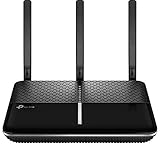
- Powerful 1.8GHz dual core processor leading edge 1.8GHz dual core 64 bit CPU with 2 co processors and...
- Faster Wi Fi enjoy 4K video and play online games simultaneously with ultra fast 802.11AC Wave 2 MU MIMO...
This budget friendly router is dual band (2.4GHz & 5GHZ) and is armed with some of the latest router technologies in the market. The router also comes with an anti-virus, parental control and some network prioritization settings. This is the kind of router that helps you customize a lot of your router settings to meet your unique network preferences. Fast internet speeds means your family can enjoy 4K video streaming, play multiplayer online games and do some web surfing without suffering any buffering or loss of connection.
The ac2300 has a basic design and is lightweight. It comes in a black color with mid-sized antennas at the back. At the front you have a mesh like covering for heat dissipation. At the back you get four LAN Gigabit ports and a WAN Gigabit port. The router is also armed with 2.0 USB port and 3.0 USB port. The ac2300 is a small router measuring 8.5 x 7.5 x 1.5 inches and is powered by a Broadcom BCM4365E chip that is capable of supporting the dual bands. You also get 128 flash memory and 512MB of RAM. This enables the router to support speeds of up to 1.625Gbps for the 5GHz band and 600Mbps for the 2.4GHz band. This gives the ac2300 a total bandwidth of 2.225Gbps.
When it comes to setup you can either do it through the a web browser or the TP Link Tether app. There is also the option of the cloud TP link – this allows you to manage your router remotely from anywhere. You can upgrade the firmware with time so that your router is up to date at all times.
This router comes with a lot of awesome management settings like the TP Link HomeCare (this is powered by Trend Micro), Quality of Service settings, parental controls and an anti-virus software to keep your network well protected from malware and viruses. Lastly, the router comes with a cool feature called the RangeBoost that enables the router to peak any device weak signals.
Overall, the ac2300 is a router that one can ignore if you are making a judgment based on appearance only. It is packed with some awesome features that we see in high end routers but at an affordable price. The router comes with the Broadcom NitroQAM modulation technology that allows it to squeeze in data frequencies so that you have a boost in speeds by up to 25%.
What we like:
- Awesome management settings
- Fast router speeds
- Compact design
- Many customization options
What we did not like
- The 2.4GHz is not that impressive
TP Link ac2600 – Overview

- Enjoy 4K HD video and play online games with high-performance 4-stream AC2600 Wi-Fi
- Faster Wi-Fi for every device with multi-user support from MU-MIMO technology
The ac2600 is a one of the latest routers from TP-Link. It comes equipped with some of the latest router management settings including technologies like MU-MIMO. The router ensures efficient distribution of bandwidth to multiple devices without necessarily slowing them down. This is because it capitalizes on the latest Qualcomm VIVE 802.11ac technology.
A 1.4GHz dual core Qualcomm chipset powers the ac2600,this supplies sufficient processor speed to enable the router achieve speeds of up to 1,733Mbps on the 5GHz band and 800MHz on the 2.4GHz band. The router measures a decent 1.5 X 10.4 X 7.8 inches and comprises of black matte finish. You also get some attractive silver trims on the sides.
The router comes with four removable and adjustable antennas that are positioned at the back. You also get a WAN port, four Gigabit Ethernet ports, power switch and power jack. To the right side of the router you get two 3.0 USB ports that will come in handy for connecting your peripherals like printers. You can check the status of your two bands -2.4GHz and 5Ghz from the LED lights mounted on the top of the router. While the ac2600 comes with MU-MIMO technology, not many client devices actually support the technology. However, you get the Quality of Service (QoS) feature that allows you to give priority to certain devices on the network. This is a great feature when you have a large home with so many devices connected to your network. You can choose to add those devices to the QoS that you know handle critical data. While the speeds to the router are great, the 2.4GHz is a bit of a disappointment and you may want to stick to the 5GHz when you are doing some heavy downloading.
Setting up the ac2600 is simple as all you have to do is login to their web-based management console. Here you will get a host of basic and advanced settings. You can create passwords, SSID names and setup your guest networks from here. The device also allows you to setup your parental controls through listing some keywords. You can also control the time the kids get to access the internet. The advanced settings page allows you to configure stuff like security settings (WEP, WPA/WPA2, Enterprise) as well as channel width and network details for the Dynamic DNS and DHP. The router also has a QoS feature that allows you to prioritize devices accessing your network.
What we like:
- The 5GHz band is really fast
- Compact design ideal for homes
- Comes with the latest MU-MIMO technology
- Easy to setup and install
What we did not like:
- The 2.4GHz does not perform that well in throughput tests
Conclusion: Which is better? TP Link ac2300 or TP Link 2600?
The decision to choose between the TP Link ac2300 and 2600 is a hard one as the same company designs the two models. This means you are going to experience some overlaps in the router features. However, we have a clear winner – the TP Link 2300. The router has an ordinary outward appearance but it is really powerful. It comes with anti-malware filtering and a fast processor that enables it to reach speeds of up to 600Mbps for the 2.4GHz band and 1.625GHz for the 5Ghz band.
FAQ
Will the MU-MIMO ac2600 support all my devices?
It is not uncommon to note that almost all high end routers are now deploying innovative router technologies like MU-MIMO and beamforming. The technology gives you the ability to increase the number of antennas been used by a device. It stands for multiple inputs multiple outputs and is a technology that comes in handy when you have many devices using your router. However, there some client devices that don’t support it.
Can I access the ac2300 web interface on Windows 7?
You can install and setup the ac2300 through the web interface or Mobile app. When it comes to the web interface know that it supports Windows 7, 8, 8.1, 10, Netware, MAC OS, Firefox 12.0 among others. The TP link interface is also available in cloud so you can change your router settings from anywhere.


